
Download My Mouse Meter – Free Windows Tool to Control Mouse Movement Distance
My Mouse Meter is a lightweight, free software tool designed exclusively for Windows users who want precise control over their mouse movements. This utility helps you monitor and manage the distance your mouse cursor travels across the screen, making it ideal for users who need accuracy in tasks such as graphic design, gaming, or detailed editing. Since its release in 2006, My Mouse Meter has gained steady popularity, with over 6,700 downloads and consistent usage across regions like the Czech Republic, China, and Germany.
Despite its age, the software remains functional and secure for older Windows systems, including Windows 2000 and earlier versions. With a minimal footprint and no resource-heavy demands, My Mouse Meter is perfect for users seeking a simple, no-frills solution. Whether you're adjusting mouse sensitivity or troubleshooting cursor drift, this tool provides real-time feedback on mouse movement, helping you fine-tune your setup.
The latest version, 1.0.8, was updated on March 27, 2006, and is available in English. If you're searching for a reliable, free software utility to enhance your mouse experience on Windows, My Mouse Meter is a solid choice.
Key Features of My Mouse Meter
My Mouse Meter offers a surprisingly effective set of features for a tool that’s been around since 2006. At its core, the software is designed to measure and display the distance your mouse cursor travels across the screen in real time. This is especially useful for users who work with high-precision tasks—graphic designers, digital artists, and even competitive gamers—where even a slight deviation in cursor movement can affect results. The interface is minimalistic and unobtrusive, displaying a small, customizable meter that updates continuously as you move your mouse. You can adjust the scale, color, and position of the meter to suit your workflow, ensuring it doesn’t interfere with your screen space.
One of the standout features is the ability to track mouse movement in pixels. This level of detail allows users to fine-tune their mouse sensitivity settings, helping them achieve consistent and accurate movements. For example, if you're calibrating your mouse for a specific game or design project, knowing exactly how many pixels your cursor moves per inch can make a significant difference. The tool also supports keyboard shortcuts for quick toggling on and off, which is handy when you need to temporarily disable the meter during presentations or focused work sessions.
Another benefit is its compatibility with older Windows systems. My Mouse Meter runs smoothly on Windows 2000 and earlier versions, making it a rare find in today’s software landscape. This is particularly valuable for users still relying on legacy systems or those who prefer lightweight applications that don’t bog down older hardware. Despite its age, the software remains secure and stable, with no reported malware or performance issues. It’s also completely free, with no ads, in-app purchases, or hidden costs—making it a trustworthy option for anyone seeking a no-nonsense mouse utility.
How to Install and Use My Mouse Meter
Installing My Mouse Meter is straightforward and requires no complex setup. Since it’s a portable application, you don’t need to go through a traditional installation process. Simply download the software from a trusted source, extract the files to a folder on your computer, and run the executable file (typically named MyMouseMeter.exe). The program starts instantly and begins monitoring your mouse movements without requiring admin rights or system changes.
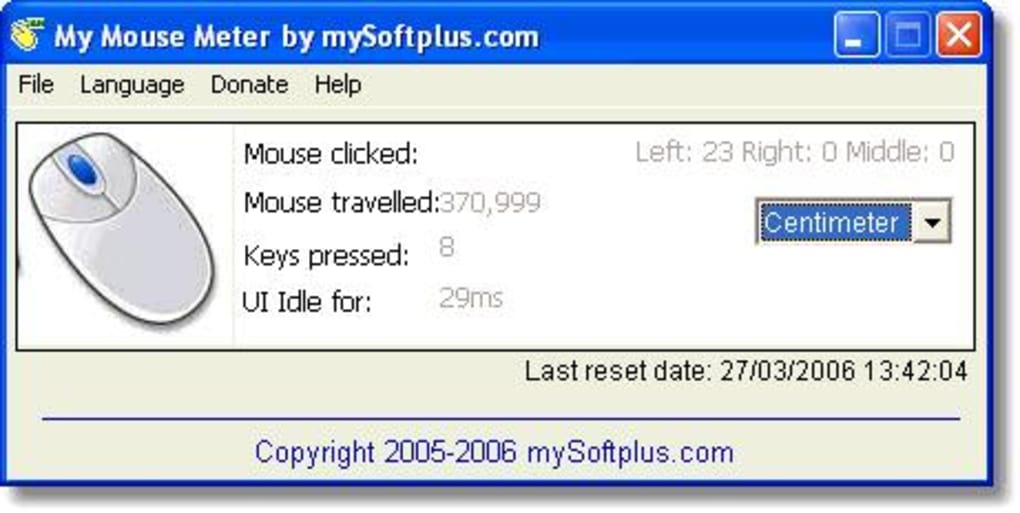
Once launched, you’ll see a small, translucent meter on your screen—usually located in the corner—showing the distance your mouse has traveled. The meter updates in real time, displaying values in pixels. You can right-click the meter to access the settings menu, where you can customize its appearance and behavior. Options include changing the color, font size, position, and scale of the measurement. You can also choose whether the meter resets after a certain time or continues accumulating distance over multiple sessions.
For advanced users, the software supports keyboard shortcuts to toggle the meter on and off, which is ideal for switching between focused work and casual browsing. The simplicity of the interface ensures that even non-technical users can get up and running in seconds. There’s no need to read lengthy manuals or configure complex settings—just launch, use, and adjust as needed. The tool is particularly useful during mouse calibration, where you can move the cursor a known distance and check the displayed value to verify accuracy.
Because My Mouse Meter is lightweight and doesn’t run in the background unnecessarily, it won’t slow down your system or consume significant RAM. It’s an excellent choice for users who want a reliable, low-impact utility that delivers consistent results. Whether you’re troubleshooting mouse issues, setting up a new graphics tablet, or just curious about your mouse’s precision, this tool provides the insights you need with minimal effort.
Compatibility and System Requirements
My Mouse Meter is specifically designed for Windows operating systems and is fully compatible with Windows 2000 and earlier versions. This includes older systems like Windows ME, Windows 98, and Windows XP, making it a rare gem for users still running legacy software environments. While modern Windows versions like Windows 10 and 11 may not be officially supported, some users have reported success running the program via compatibility mode, though results may vary.
The software is extremely lightweight, requiring minimal system resources. It doesn’t need a specific processor speed or large amounts of RAM—just a basic Windows machine with a standard mouse. The file size is under 1 MB, so it won’t take up valuable disk space. This makes it ideal for older computers with limited storage or users who prefer to keep their systems clutter-free.
Since it’s a portable application, My Mouse Meter doesn’t install any registry entries or background services. This enhances security and privacy, as there’s no risk of the software collecting data or modifying system settings. It can be run directly from a USB drive, making it a convenient tool to carry between machines. For users who value simplicity, portability, and compatibility with older systems, My Mouse Meter is a reliable choice.
It’s important to note that the software hasn’t been updated since 2006, so it may not support newer hardware or advanced mouse features like high DPI or wireless connectivity. However, for basic mouse movement tracking on older systems, it remains highly effective and secure. If you’re using a modern Windows setup, consider pairing it with other tools for enhanced functionality, but for its intended purpose, My Mouse Meter still delivers.
Pros and Cons of My Mouse Meter
- Pros:
- Completely free and ad-free software
- Extremely lightweight with minimal system impact
- Supports older Windows systems (2000 and earlier)
- Portable—no installation required
- Real-time mouse movement tracking in pixels
- Customizable meter appearance and position
- Simple, intuitive interface
- Secure and stable with no known malware
- Cons:
- No updates since 2006—may lack support for modern hardware
- Not compatible with Windows 10/11 out of the box
- Limited features compared to modern mouse utilities
- No built-in calibration tools or advanced analytics
- Only available in English
Frequently Asked Questions (FAQ)
Is My Mouse Meter safe to download?
Yes, My Mouse Meter is considered safe to download. It has been around since 2006 and has been downloaded over 6,700 times without any reported security issues. The software is free, portable, and doesn’t install any registry entries or background processes. Always download from trusted sources to ensure you’re getting the original version.
Can I use My Mouse Meter on Windows 10 or 11?
While My Mouse Meter was designed for older Windows systems, some users have successfully run it on Windows 10 and 11 using compatibility mode. However, it’s not officially supported, and results may vary. For best performance, it’s recommended for use on Windows 2000 and earlier.
Does My Mouse Meter require installation?
No, My Mouse Meter is a portable application. You can run it directly from a folder or USB drive without installing it. Simply extract the files and launch the executable file to start using it.
Can I customize the meter’s appearance?
Yes, you can customize the color, font size, position, and scale of the meter. Right-click the meter to access the settings menu and adjust these options to fit your preferences.
Is My Mouse Meter available in languages other than English?
No, My Mouse Meter is currently only available in English. There are no language options or translations provided.
Final Verdict: A Reliable Tool for Legacy Systems
My Mouse Meter may be an old tool, but it remains a reliable and effective solution for users who need to monitor mouse movement distance on older Windows systems. Its lightweight design, portability, and zero cost make it a standout choice among free software utilities. While it lacks modern features and isn’t compatible with newer Windows versions, it excels in its niche—providing accurate, real-time pixel tracking with minimal system impact.
If you’re working with legacy hardware, calibrating a graphics tablet, or simply want to understand how your mouse behaves, My Mouse Meter delivers exactly what it promises. It’s a secure, no-frills tool that doesn’t overcomplicate things. For users who value simplicity and functionality over flashy interfaces, this software is a hidden gem.
Download My Mouse Meter today and take control of your mouse movements—free, fast, and secure. Whether you’re a designer, gamer, or just curious about your cursor’s behavior, this tool offers precise insights without the clutter.







